Resource-based Role Plays
Last updated: April 22, 2026
Second Nature allows the creation of training role plays using a diverse range of resources. These resources can include company-specific materials, industry-related content, scorecards, and more.
After a resource is uploaded, the information is extracted to generate customer profiles, defining potential challenges or objections. The extracted data is then used to tailor the AI Persona's responses and behaviors, ensuring that the role play is both engaging and relevant.
NOTE:
At the moment, only one English-based resource can be used at a time.
Resource Types
There are four types of resources that can be added to Second Nature. The resources can be added in the Craft Your Simulation from Existing Resources section in the course editor.
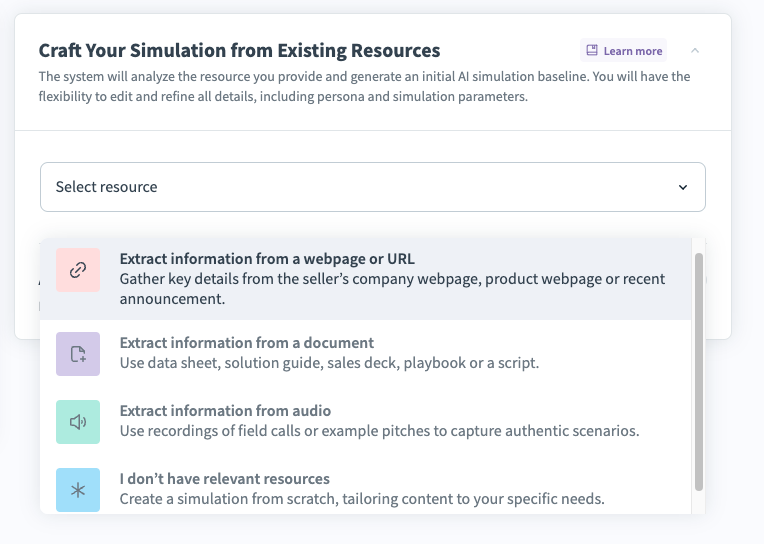
Resource Types - Explanation
Resource Analysis Method | How it works | Format | Additional Details |
Extract information from a webpage or URL | Enter a public facing link, such as a product listing or company's website. | URL | This must be a public facing URL. Do not use links that require a login, such as internal links or links behind a paywall. We will only look at and analyze the specific webpage you include. Any other pages on the same website will not be included in the analysis. Example: Second Nature Product page: https://secondnature.ai/product/ |
Extract information from a document | Enter a data sheet, solution guide, sales deck, playbook, or a script. | MD, TXT, CSV, PDF, DOC, DOCX or PPTX file | Text must be in English. PPTX max size: 100MB. Other formats max size: 200MB. Example: Scorecard used by your org or a PowerPoint on a product recently launched. |
Extract information from audio | Upload a recording of a real sales call or sample pitches. | AAC, WAV, WEBM, MP3, or MP4 file | File max size: 200MB. [Conversation must be in English.] Example: Audio file from your CRM. |
I don't have relevant resources | Create a role play from scratch, tailoring content to your specific needs. | N/A |
Allow trainees to upload their own resource
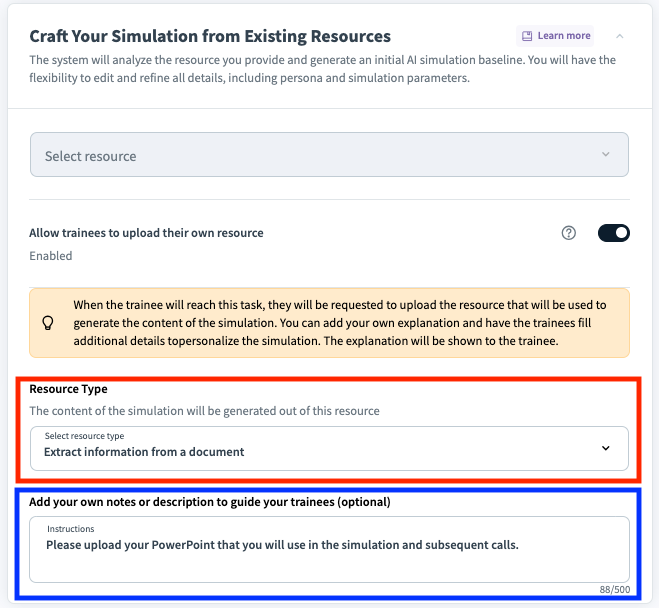
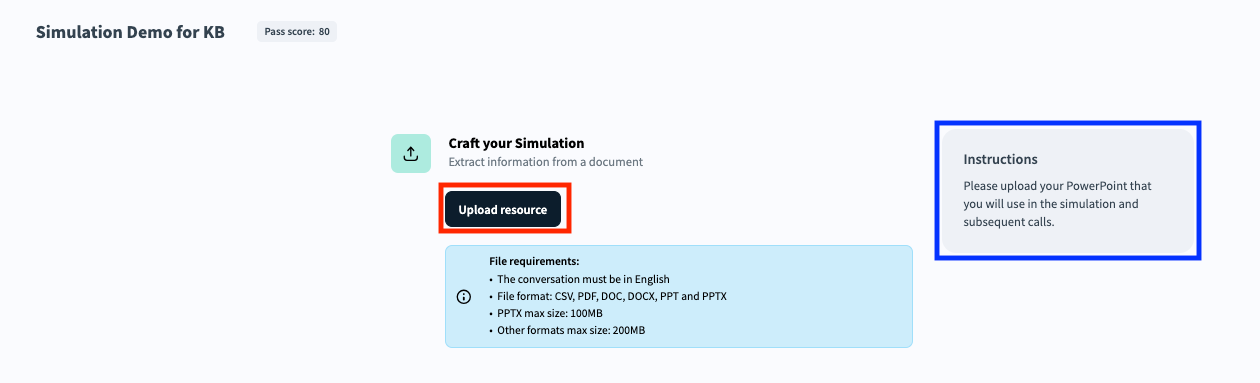
There is an option to have trainees upload their own resource instead of providing one for them. Simply toggle the Allow trainees to upload their own resource option on to enable this feature. With this option enabled, the course creator must decide the type of resource the trainee will be able to upload: webpage, document or audio. The course creator may also provide text instructions for the trainee on what they should upload.
Example of a course creator setting up a role play where trainees are asked to upload a presentation:
Screenshot below depicts the trainee’s view of how to upload their own resource
TIP:
Now that you understand how uploading resources works, continue reading sections of “Customizing Simulation Tasks”.