Collateral Tasks Overview
Last updated: April 22, 2026
Contents:
Tasks Overview
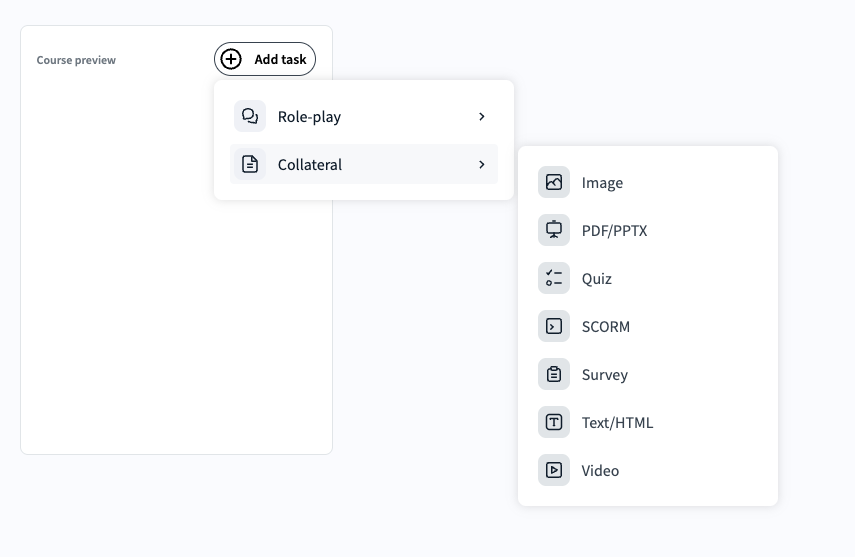
Second Nature courses are made up of building blocks called tasks, classified as either simulation or collateral. Each course entails a mix of task types designed to educate or assess the trainee.
NOTE:
The lists of task types below may be incomplete as new tasks are routinely added.
Collateral tasks
Collateral tasks are multimedia tasks used for training. Collateral tasks typically provide information relevant to the course, such as material informing the trainee on how to engage with a simulation or what the trainee will be scored on.
TIP:
It is common to begin a course with several collateral tasks before a simulation so that the trainee receives a refresher on relevant information. For example, a course may contain a one-pager PDF file, a quiz on the material, a presentation about the persona the trainee will sell to, a video demonstrating a manager pitching, and then the simulation tasks.
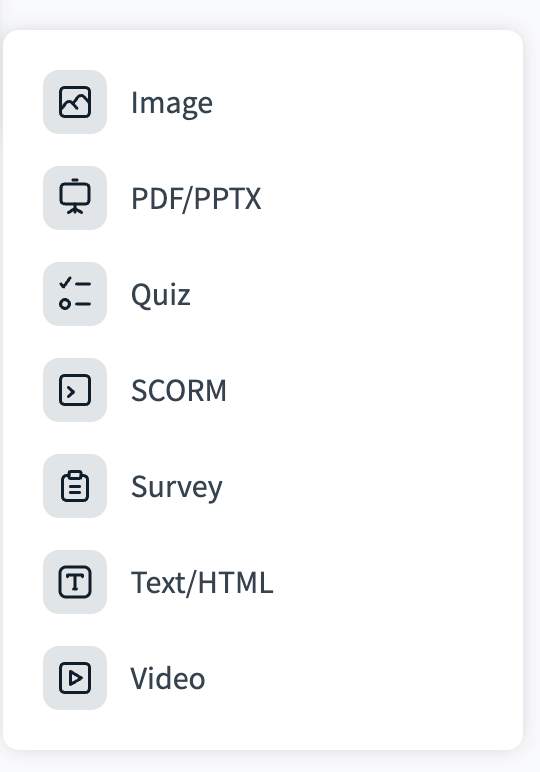
List of collateral task types
Task Type: Video
Task Description & Purpose: Video tasks are used to add an informative video for the trainee to gain additional knowledge needed for the course.
Format: YouTube URL or upload an MP4, AVI, or WMV file
Additional Notes: Max file size: 1GB. Does not support non-YouTube URLs or MKV files.
Example: A training video explaining the sales process and lifecycle.
Task Type: Text/HTML
Task Description & Purpose: This task is used to present text for the trainee to read.This text may include HTML markup.
Format: Text or HTML
Additional Notes: Press See HTML code in the toolbar if you would like to upload HTML.– Example: Text from a catalog discussing product features.
TIP:
It is advised you use the Image task, not Text/HTML, for sharing images.
Task Type: PDF/PPTX
Task Description & Purpose: This task is used to upload a presentation (ex: PowerPoint) style document or PDF.
Format: PDF or PPTX
Additional Notes: File max size: 100MB.
* Example: A PDF containing detailed product specifications.
Task Type: Survey
Task Description & Purpose: This task is used to share a form that asks opinion-based questions, one at a time.
Format: Typeform Surveys only
Additional Notes: Simply add the Typeform Survey ID.
Example: A survey to gather trainee feedback on the course material.
Task Type: Image
Task Description & Purpose: This task is used for uploading a static image or GIF.
Format: JPEG, JPG, PNG, GIF, SVG, WEBP, and other common image formats
Example: An infographic summarizing key selling points.
Task Type: Quiz
Task Description & Purpose: This task is used to create multiple-choice and open-ended quizzes to assess trainee’s knowledge of a topic.
Format: Text
Additional Notes: This is a scorable collateral task. Quiz scores will be visible in analysis and reports. See “Creating a quiz (task)” for more information.
Example: A quiz testing knowledge of product features and benefits.
Task Type: SCORM
Task Description & Purpose: This task enables the user to upload SCORM packages from their LMS to Second Nature. It helps course editors and admins centralize their training into one hub and helps diversify the training knowledge with content that can only be obtained by the editors/admins LMS.
Format: SCORM requires an upload of a .zip file created from an LMS (Learning Management System (filetype)).
Example: A comprehensive eLearning module on compliance training.